
35 Meeting Feedback Survey Questions (+ 3 Templates)
35 meeting feedback survey questions for team syncs, all-hands and recurring meetings, three short templates, and a weekly routine that makes meetings better.

10 minutes
Table of contents
Meeting feedback survey questions
Most teams have at least one meeting that everyone attends and nobody would defend. It runs over by ten minutes, the same two people do most of the talking, and the useful part could have been a message. The person who runs it usually thinks it went fine.
That gap is well documented. Steven Rogelberg and Liana Kreamer cite a 2003 Verizon survey of more than 1,300 active meeting-goers in which nearly four out of five rated the meetings they had called themselves as extremely or very productive, while only just over half said the same about meetings their peers had called. Rogelberg has put it bluntly: "leaders are poor perceivers of their true abilities to lead meetings."
A short feedback survey gives the organizer the view from the other chairs. Below are 35 meeting feedback survey questions grouped by what they help you find out, three templates you can send as they are, and a weekly routine for turning the answers into a better meeting.
When a meeting feedback survey is worth sending
Recurring meetings are the best candidates. A weekly team sync, a Monday planning session or a fortnightly cross-team update happens again in a few days, so whatever you learn can be tried straight away and checked the following week.
Big one-off meetings deserve a survey too: an all-hands, a quarterly planning day, a project kickoff or an offsite. These take a lot of people's time at once, and the organizer rarely gets an honest read on them from hallway comments.
A survey also helps when you're testing a change. If you cut the weekly sync from 60 to 30 minutes, or moved status updates into a written thread, ask for three or four weeks whether the meeting still does its job.
There are meetings where a survey is overkill. A one-to-one has better ways to get feedback, namely asking in the conversation. A meeting that happens once and won't repeat, with five people, rarely needs a form. And no meeting needs a survey every week forever; after the first month, switch to once a month or once a quarter.
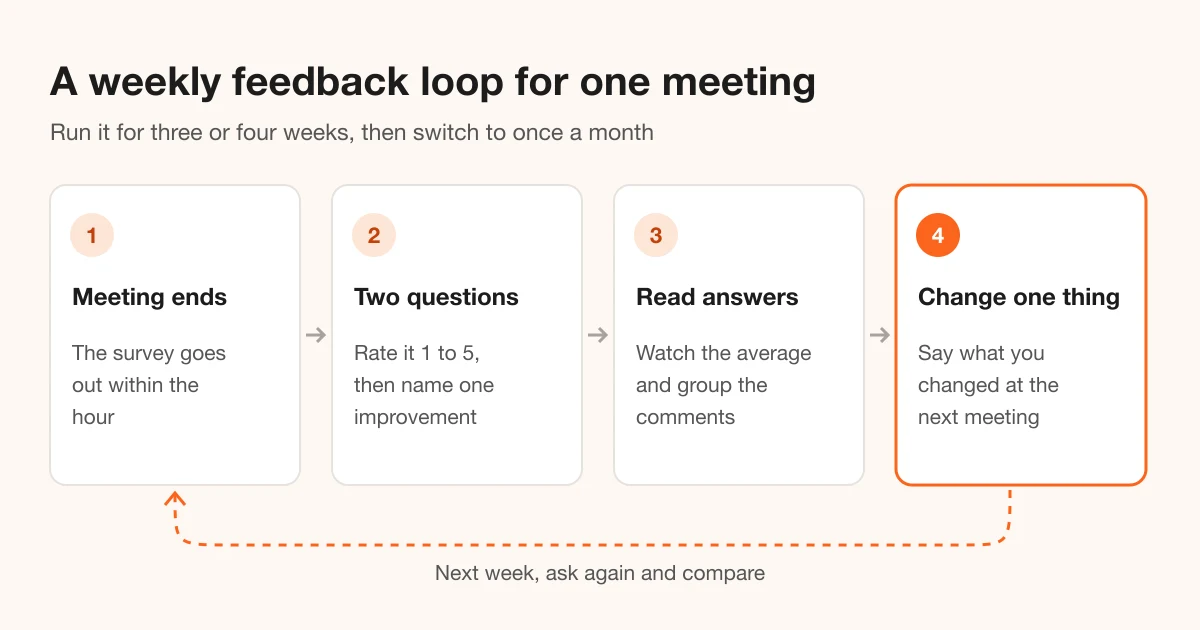
Timing matters more than wording. Send the survey within an hour of the meeting ending, while people still remember who talked and where it dragged, and close it before the next one so you have time to act.
Start with two questions
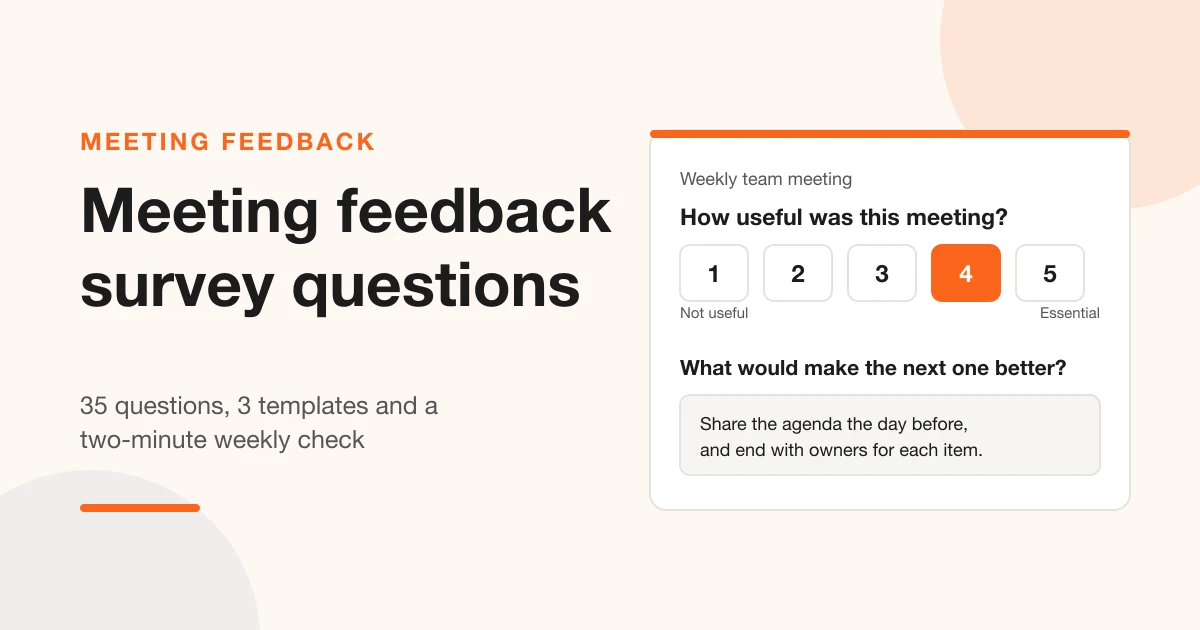
The most useful meeting survey is also the shortest. Ask for a rating and one improvement:
- How useful was this meeting? (1 = not useful, 5 = essential)
- What would make the next meeting better?
The rating gives you a number you can compare week to week. The open question gives you something specific to change. Two questions take less than a minute to answer, so people keep answering after the novelty wears off, which matters more than any single clever question.
Add more questions when you have a specific doubt, like whether the meeting is too long or whether the right people are invited, and take them out again once you have the answer.
Questions about the meeting's value
These tell you whether the meeting is worth having at all. Use one of them as the headline question you track over time.
- How useful was this meeting for you, from 1 to 5?
- Did this need to be a meeting, or would a written update have worked?
- Did you leave with something you didn't have when you came in?
- Would you still attend if this meeting were optional?
- Was this a good use of the time it took?
Question 4 is uncomfortable to ask and very informative. If most of the team says no, the meeting is running on habit.
Questions about purpose and agenda
A meeting without a clear purpose drifts. These questions show whether people knew why they were there and could prepare.
- Was the purpose of the meeting clear before it started?
- Did you get the agenda early enough to prepare?
- Did we stick to the agenda?
- Which agenda item was most useful to you?
- Was there anything on the agenda that didn't need the whole group?
Question 10 is the quickest way to shorten a meeting. Items that only matter to two people can move to a smaller conversation.
Questions about time and pace
- Was the length about right, too long or too short?
- Did the meeting start and end on time?
- Where did we spend too long?
- Would this work better as a shorter meeting, or a less frequent one?
Ask question 11 as a three-option choice rather than a scale. "Too long" from half the room is easier to act on than an average of 2.7.
Questions about participation
A meeting where the same voices dominate loses the people who think before they speak. These questions show who's getting heard.
- Did you get a chance to say what you wanted to say?
- Were the right people in the room?
- Was your attendance necessary for this meeting?
- Did the discussion feel open to different views?
- Was there anything that should have been raised but wasn't?
Question 17 gives people a polite way to say they'd rather read the notes. When several people say it, shrink the invite list and share a written summary instead.
Questions about decisions and next steps
The test of most working meetings is what happens after them. If people leave unsure what was agreed, the meeting will happen again next week with the same agenda.
- Do you know what was decided?
- Are you clear on your own next steps?
- Did every action item leave with an owner and a date?
- Was there a decision we could have made faster?
- Is anything still unresolved that needs a follow-up?
Questions for the facilitator
Ask these when the meeting has a regular facilitator who wants direct feedback, and keep them about behaviors rather than personality.
- How well did the facilitator keep the discussion on track?
- Did the facilitator make room for quieter people?
- What should the facilitator do more of next time?
- Was the pre-read or shared material useful?
If the facilitator role rotates, these questions help each person learn from their turn. A tool like our Round-robin Rotation app can announce whose turn it is in Slack, so the rotation doesn't depend on someone remembering.
Questions for all-hands and large meetings
Large meetings are mostly one-way, so the useful questions are about relevance and whether people's own questions got answered.
- Which update was most useful to you?
- Did you get an answer to the question you came with?
- What topic would you like covered at the next all-hands?
For question 29, list the agenda items as answer options. After two or three all-hands you'll see which segments people value and which ones they tune out of.
Questions for remote and hybrid meetings
When some people are in a room and others are on a call, the people on the call usually have a worse meeting. Ask them directly.
- If you joined remotely, could you hear and follow everything?
- Did remote attendees get the same chance to contribute as people in the room?
Open questions that bring out specifics
- What would make the next meeting better?
- If you ran this meeting, what's the first thing you'd change?
Question 35 works because it moves people from complaining to designing. You'll get answers like "start with decisions, then updates" or "drop the round-the-table", which you can try next week.
3 meeting feedback templates
1. The weekly team meeting check
For any recurring team meeting. Send it after every meeting for a month, then monthly.
- How useful was this meeting? (1 to 5)
- What would make the next meeting better? (open, optional)
Making the open question optional keeps the response rate up on weeks when nobody has anything new to say.
2. All-hands feedback
For company or department-wide meetings. Send it anonymously within an hour of the meeting.
- How useful was today's all-hands? (1 to 5)
- Which update was most useful to you? (choice of agenda items)
- Did you get an answer to the question you came with? (Yes / Partly / No / I didn't have one)
- What topic would you like covered next time? (open)
3. The meeting audit
For a recurring meeting you suspect has outlived its purpose. Run it once, anonymously, and decide based on the answers.
- Would you still attend this meeting if it were optional? (Yes / No / Not sure)
- What should happen to this meeting? (Keep it as is / Make it shorter / Make it less frequent / Replace it with a written update / Stop it)
- Was your attendance necessary? (Yes / Sometimes / No)
- If you ran this meeting, what's the first thing you'd change? (open)
If more than half the team picks "Replace it with a written update", try that for a month and run the audit again.
How to read the answers
A single bad week tells you little. Someone had a rough morning, the meeting ran into a deadline, the projector broke. A slow slide in the average, say from 4.2 to 3.4 over five weeks, means something has changed and is worth raising with the team.
Read every comment before you look for patterns. With a team of eight you'll get a handful each week, so it takes five minutes. Sort them into rough themes like length, agenda, participation or follow-up, and pick the theme that came up most often. That's next week's change.
Change one thing at a time. If you shorten the meeting, move updates into a thread and hand the facilitation to someone else all in the same week, the next rating won't tell you which change helped.
Then tell people what you changed. One sentence at the start of the next meeting is enough: "A few of you said the updates run long, so this week they're in the thread and we start with decisions." Teams keep answering feedback surveys when they can see their answers lead somewhere, and quietly stop when nothing happens.
Small groups need some care. In a meeting of four, a rating of 1 can often be traced to a person even in an anonymous survey. Keep the questions about the meeting rather than about individuals, and resist guessing who wrote what.
Running meeting feedback in Slack
Most meeting feedback forms fail on the same detail: they arrive by email, an hour after the meeting, and get buried. A survey that appears in the Slack channel where the team already talks takes seconds to answer.
Polls & Surveys has a built-in Meeting feedback template with the two core questions: "How useful was this meeting?" on a 1 to 5 scale from "Not useful" to "Essential", and "What would make the next meeting better?" as a written answer. A typical setup:
-
Start from the template. Type
/pollin the team channel, choose Meeting feedback, and add or swap questions from the list above. You can mark each question as required or optional. -
Schedule it to land as the meeting ends. Set the survey to repeat every week at the time your meeting finishes, and end the series after four runs if you only want a month of feedback. Each run keeps its own results, so you can compare this week with the last.
-
Turn on anonymous responses for candid answers. In an anonymous poll no one, including poll admins and workspace admins, can see who answered. Our guide to anonymous polls in Slack covers when that helps and where its limits are.
-
Decide who sees results. Results can be shown live, only to people who answered, after the poll closes, or to poll admins only. For feedback about a meeting the team lead runs, "after the poll closes" keeps the first answers from steering the rest.
People answer in a short form that opens from the message, and the dashboard shows the response rate, a histogram of the ratings and every written answer for each run. On the Unlimited plan you can also send each attendee a private copy instead of posting in a channel, remind people who haven't answered, export the results as a CSV, and save your version of the survey as a workspace template for other teams to reuse.
If you've never set up a poll in Slack before, how to create a poll in Slack walks through the options.
Mistakes that make people stop answering
Asking too much. A ten-question survey after a 30-minute meeting gets answered once. Keep the weekly version to two questions.
Surveying every meeting. If people get a form after every standup, sync and review, they start ignoring all of them. Pick the one or two meetings you most want to improve.
Collecting feedback you won't act on. If the meeting can't change, because its format is fixed by someone else, don't ask. Asking and then doing nothing is worse than not asking.
Getting defensive in public. If someone writes that the meeting is a waste of time, thank the team for the honesty and ask what would make it worth attending. Replying with a justification teaches everyone to stop writing comments.
Using the survey instead of the conversation. A survey tells you something is wrong. Sometimes the fix needs a ten-minute discussion with the team. For deeper problems with how a team works, a sprint retrospective is the better format.
Frequently asked questions
How many questions should a meeting feedback survey have?
For a recurring meeting, two questions are enough: a 1 to 5 rating of how useful the meeting was and one open question about what would make the next one better. Save longer surveys of four or five questions for big one-off meetings like an all-hands, an offsite or a quarterly planning session.
When should you send a meeting feedback survey?
Send it within an hour of the meeting ending, while people still remember it, and close it before the next meeting so you have time to read the answers and change something.
Should meeting feedback be anonymous?
Usually, yes. People are more candid about a meeting run by their manager when their name isn't attached. In a very small group anonymity is easy to break, so keep the questions about the meeting rather than about individuals.
What's the difference between meeting feedback and a retrospective?
A meeting feedback survey asks about one meeting: whether it was useful, well run and worth the time. A retrospective looks back at a whole period of work, such as a sprint or a project, and asks how the team worked together. Many teams use both: quick feedback after a recurring meeting, and a retro every few weeks.
Related articles
Written by
Keep reading


 How to Run an Anonymous Poll in Slack
Nov 24, 2026