
Office Attendance Poll: Plan Hybrid Office Days in Slack
How a weekly office attendance poll helps a hybrid team see who's in and when, with six ready-made poll questions and a simple Monday routine in Slack.

9 minutes
Table of contents
Office attendance poll
Every hybrid team has had the same Tuesday. You catch the early train, find a desk, open your laptop and spend the day on video calls with teammates who all stayed home. Nobody did anything wrong. Everyone simply picked their office days on their own.
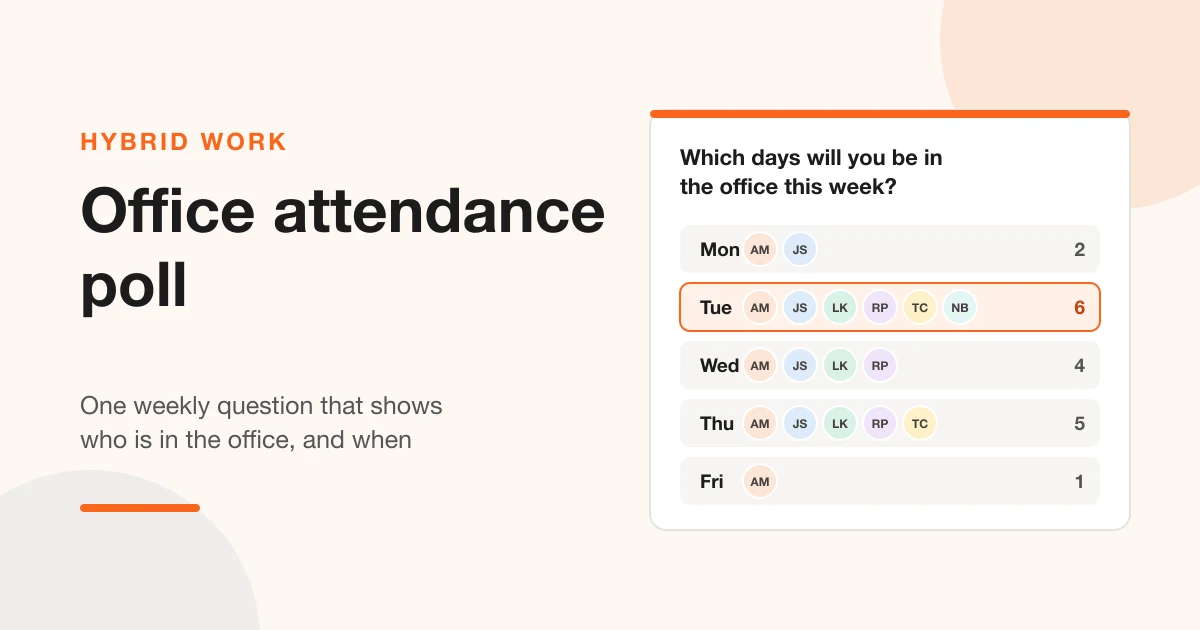
An office attendance poll fixes that with one question a week: which days will you be in? The answers sit in the team channel, so anyone can check who will be there before deciding whether the commute is worth it. It takes each person a few seconds, and over a few weeks it tends to turn scattered office days into one or two days when the team is actually together.
This guide covers why hybrid teams drift apart in the first place, how to set up a weekly attendance poll, six poll questions for different situations, and what to do with the answers.
Why hybrid teams end up in an empty office
Company policy usually decides how many days people come in. It rarely decides which days a particular team overlaps, and that's the part that makes an office day useful.
Gallup's research on hybrid work shows how uneven the week is. In its 2023 analysis, hybrid workers were most commonly in the office on Tuesdays, Wednesdays and Thursdays. Mondays were slower, at about 49% attendance, and Fridays were described as a "ghost town" with only a third of hybrid workers in. On average, hybrid workers reported coming in 2.6 days a week. The midweek pattern is still visible in building data: in Kastle Systems' Back to Work Barometer for the week of November 10, 2026, Tuesday was the peak day nationally across the US office buildings it tracks.
So most people already come in midweek. The trouble is that "midweek" covers three days, and a team of eight spread across them can easily end up with three people on Tuesday, two on Wednesday and three on Thursday, never all in the same room.
Gallup's same analysis found that only 12% of hybrid employees said their team used a collaborative process to decide its hybrid arrangements. Most teams leave it to chance, or to whoever speaks up first in a meeting. A weekly poll is a small, low-effort way to make the decision visible and shared.
What an office attendance poll is for
The weekly poll is a planning tool. It answers practical questions: is it worth going in on Wednesday, how many people need a seat at Thursday's lunch, should the design review happen in person or on a call.
It works badly as a compliance tool. If people suspect their answers will be checked against badge data or brought up in a performance review, they'll either stop answering or tick the days they think they're supposed to. Say clearly, when you start, that the poll is there to help the team coordinate and that nobody will be counted against a quota with it. Then keep that promise.
How to set up a weekly office attendance poll
Ask one question
"Which days will you be in the office this week?" with Monday to Friday as answer options, and people can pick as many as apply. Adding a question about times, desks or reasons makes the poll slower to answer and it stops being a weekly habit.
People who are remote all week can simply not answer, but then you can't tell them apart from people who forgot. If that matters for your team, add a sixth option such as "Remote all week".
Send it at the start of the week
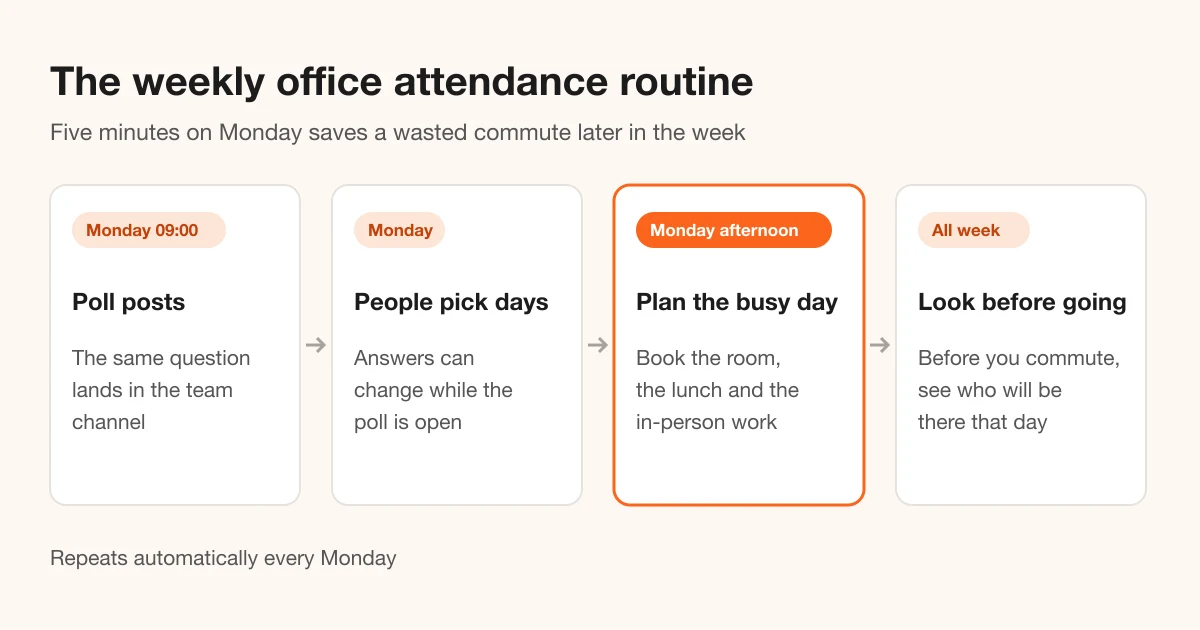
Monday at 9:00 suits most teams, because plans for the week are fresh and there's time to adjust. If your office needs rooms or desks booked a few days ahead, send it on Friday afternoon instead and ask about next week.
Post it in the team channel, with names visible
The whole point is seeing who will be there, so the poll should not be anonymous. Post it in the channel your team already uses, not a company-wide channel where results from fifty people would bury the six you care about.
Let people change their answers
Plans move. A sick child, a delivery, a client visit. Keep the poll open through the week so people can update their days, and the message stays a reliable picture of who's coming.
6 office attendance poll questions for different situations
The weekly poll covers most of the coordination, but a few other questions come up often enough to keep ready.
1. The weekly check
Which days will you be in the office this week? Monday / Tuesday / Wednesday / Thursday / Friday (pick all that apply)
Recurring, every Monday morning. Names visible, results live.
2. Planning next week
Which days will you be in the office next week? Monday / Tuesday / Wednesday / Thursday / Friday (pick all that apply)
Recurring, every Friday afternoon. Useful when you book desks, rooms or catering in advance.
3. Choosing a team anchor day
If we pick one day a week when the whole team comes in, which day works best for you? Tuesday / Wednesday / Thursday / No preference
Run once, with names visible so you can talk through the trade-offs, then agree on the day in the next team meeting. Revisit it every few months, or when someone's schedule changes.
4. Headcount for a specific event
Are you joining Thursday's planning day in person? In person / Remote / Can't make it
Send it a week before an offsite, a workshop or a visit from another office. It tells you how big a room to book and whether to set up a proper video link.
5. Team lunch
Which day works best for a team lunch? Tuesday / Wednesday / Thursday
Pair it with a second question on food preferences if someone is ordering; Polls & Surveys has a Team lunch template with both questions. Lunch on the anchor day is one of the simplest reasons for people to come in on the same day.
6. Hybrid preferences survey
A short, one-off survey before you set or change the team's routine. This one should be anonymous, because people may not want their answer attached to their name.
- How many days a week would you like to be in the office? (0 / 1 / 2 to 3 / 4 or more)
- What is the office most useful for, for you? (Collaborating on work / Meeting people / Focus time / Routine and separation from home / Other)
- What makes an office day not worth the commute? (open)
The third question is the most valuable. Answers like "nobody from my team is in" or "I spend the day on calls anyway" point straight at what the weekly poll and the anchor day are meant to fix.
Turning answers into a better office week
The poll only helps if the team does something with it. A few habits make office days feel worth the trip.
Plan the in-person work for the busiest day. Once you know Tuesday is when most people are in, put the design review, the planning session and the whiteboard-heavy work there. Leave the focus work and routine status calls for home days.
Book what the day needs. A room big enough for the team, a lunch order, the guest from another office. The Monday poll gives the organizer a headcount without chasing anyone.
Keep one-to-ones in person when you can. If a manager and a report are both in on Thursday, that's the natural slot for their one-to-one.
Make room for unplanned conversations. Much of what people miss when working from home is the chat by the kitchen with someone from another team. If your company runs Coffee Chat, you can run a separate coffee chat for an office's channel, so people who share an office get paired with colleagues they'd otherwise never meet.
Say what the poll showed. A one-line message on Monday afternoon, like "Most of us are in on Tuesday, so the roadmap review is moving to Tuesday at 2", turns a list of names into a plan.
Running an office attendance poll in Slack
Polls & Surveys has a built-in Office attendance template that asks "Which days will you be in the office this week?" with Monday to Friday as multiple-choice options, and suggests repeating it every Monday at 09:00. A typical setup:
-
Start from the template. Type
/pollin your team channel and choose Office attendance. Change the wording if you prefer to ask about next week, or add an option. -
Set the schedule. The template suggests every Monday at 09:00; switch the day and time if Friday afternoon suits your team better. You can end the series on a date or after a number of runs, and pause or edit it whenever you need to.
-
Show who picked each day. Leave the poll attributed rather than anonymous, and set voter names in the poll message to "Show all voters" so the message lists everyone under each day. Keep results live so people can see the picture as it fills in.
-
Skip the channel notification. Most weekly polls don't need an @here or @channel mention. The poll appears in the channel at the same time every week, and people get used to it.
People pick their days in a short form that opens from the poll message and get a private confirmation. They can change or remove their answer while the poll is open, and the message updates as answers come in. On the free plan a question can have up to five answer options, which is exactly Monday to Friday; adding a sixth option such as "Remote all week" needs the Unlimited plan, which also adds automatic private reminders for people who haven't answered yet.
For the one-off hybrid preferences survey, turn on anonymous responses instead. Our guide to anonymous polls in Slack explains how anonymity works and when it helps. If you're new to polls in Slack altogether, start with how to create a poll in Slack.
A few ground rules that keep it working
Keep the poll about planning. If it starts being used to check who meets an attendance target, people will stop answering honestly, and the team loses the one thing the poll was good for.
Don't make people explain their answers. Someone who is in on Monday only, or not at all this week, doesn't owe the channel a reason.
Respect people who can't come in. Caring for a family member, a long commute or a health condition can make office days harder for some colleagues. Plan important in-person sessions so remote teammates can still take part properly, with a working camera and microphone and the materials shared online.
Review the routine now and then. If the weekly poll shows the same two people alone in the office every Thursday, that's worth raising. Maybe the anchor day needs to move, or maybe Thursday doesn't need to be an office day at all.
Frequently asked questions
What should an office attendance poll ask?
One question is enough for the weekly version: which days will you be in the office this week? Offer Monday to Friday as options and let people pick more than one. Use separate, occasional polls for bigger decisions, such as choosing a team anchor day.
When should you send a weekly office attendance poll?
Monday morning works for most teams because plans for the week are fresh. Teams that need to book rooms or desks in advance often prefer Friday afternoon, asking about the following week.
Should an office attendance poll be anonymous?
No. The point of the weekly poll is to see who will be in on which day, so names should be visible. Keep anonymity for one-off surveys about hybrid work preferences, where people may not want their answer attached to their name.
What is an anchor day in hybrid work?
An anchor day is a day of the week when the whole team agrees to be in the office together. Teams usually pick one midweek day and plan collaborative work, team lunches and in-person meetings around it, while the other days stay flexible.
Related articles
Written by
Keep reading


 How to Run an Anonymous Poll in Slack
Nov 24, 2026